Founding operator pricing is open. 10 spots only.

One price per bus. Everything included.

Transparent pricing. No hidden fees. No contracts to decode.

Book a demo to start your 30-day free trial.

Transparent pricing

Never pay a % of your charter bookings. Pick your plan and pay per bus.

Standard

$40

per bus per month

Everything GridOps does, for every bus in your fleet.

Charter bookings

Included, no booking fee

Shuttle and tour online bookings

1.9% per booking, billed monthly

Onboarding

Free AI-guided onboarding, or guided onboarding for $1,500 one time

Free trial

30 days

Founding operator

First 10 operators

$20

per bus per month

Half the standard price, locked for 3 years. Offer ends December 31, 2026.

Charter bookings

Included, no booking fee

Shuttle and tour online bookings

0.9% per booking, billed monthly, locked 3 years

Onboarding

Free AI-guided onboarding, or guided onboarding for $1,500 one time

Free trial

30 days

Founding operator spots are limited to the first 10 operators. Stripe card processing fees are separate and paid to Stripe.

No hidden fees. No gated features.

01

No hidden fees, no gated features

What you see on this page is what you pay. Every feature is included on every plan, with no gated features, no per-user fees, and no long-term contracts. The only setup fee is guided onboarding, and only if you choose it.

02

Pay per bus

Add a bus, pay for a bus. Remove one, stop paying for it. Cancel anytime.

03

Your money, your Stripe

Customer payments go straight into your own Stripe account. Stripeโ€™s card fees are paid to Stripe, never marked up by GridOps.

Included with every bus

Charter quoting

Pricing profiles and rules, fast quotes, and a customer quote page with online accept and deposit.

Booking engine

Charter quote widget and shuttle booking widget on your own website, plus hosted booking pages with your branding.

Dispatch

Dispatch board, fleet calendar (day, week, and month), vehicle and driver assignment, and an action queue for unassigned trips and conflicts.

Shuttle operations

Routes, fares, recurring schedules, a departure board, and manifests.

Invoicing and payments

Invoices, payment links, deposits, refunds, and refund and deposit policies, paid into your own Stripe account.

Taxes

GST and PST on quotes and invoices.

Customer communication

An email message centre for every quote and booking.

Team and drivers

User roles and permissions, driver onboarding, and a driver schedule view.

Records

A full audit trail.

Two ways to get set up

Free

AI-guided onboarding

Set up at your own pace with step-by-step guidance inside GridOps. Fleet, pricing, taxes, payments, and your booking widget, one step at a time.

$1,500 one time

Guided onboarding

โœ“

A consultation on your service mix and pricing.

โœ“

Fleet, vehicle, and driver setup.

โœ“

Pricing profiles, tax rules, and deposit and refund policies built for you.

โœ“

Stripe connection and branded invoices.

โœ“

Booking widget installed on your website.

โœ“

Live team training.

โœ“

Quarterly check-ins for year one.

Easy to use

Built for people who run buses, not software.

If you can send an email, you can use GridOps. And you will never be left figuring it out on your own.

Meet Nash, your helper inside GridOps

Stuck? Just ask Nash.

No manuals. No waiting on hold. Type your question in plain words, the way youโ€™d ask a friend. Nash takes you straight to the right page and lights up the exact button to click.

Knows which screen youโ€™re on

Takes you straight to the page you need

Lights up the exact button to click

Here any time, day or night

Ask Nash anythingโ€ฆ

Nash

Here to help

Iโ€™ve never done this before. How do I add a bus?

No problem, Iโ€™ll walk you through it.

1. Tap Vehicles on the left.

2. Tap Add Vehicle.

3. Fill in the details and save.

Take me there

Where is Add Vehicle?

Right here. Iโ€™ve lit it up for you.

Add Vehicle

Plain English

Knows your screen

Deposit amount

The part of the price your customer pays up front to hold their booking.

Cancellation policy

A help icon on your settings

See a question mark next to a setting? Tap it. It tells you, in plain words, what it is and what it does.

Adding vehicles to your fleet

Setting up the quote widget

Setting up tax rates

70+ simple guides

Short, step-by-step guides for everything, from adding your first bus to sending your first quote. Open them any time, day or night.

Real people, happy to help

A real person when you want one

Book a call and weโ€™ll show you around. Or choose guided onboarding, and weโ€™ll set everything up with you and train your team.

Easy to use

Not a computer person? Youโ€™re in the right place.

If you can send an email, you can use GridOps. And you will never be left figuring it out on your own.

Meet Nash, your helper inside GridOps

Stuck? Just ask Nash.

No manuals. No waiting on hold. Type your question in plain words, the way youโ€™d ask a friend. Nash takes you straight to the right page and lights up the exact button to click.

Knows which screen youโ€™re on

Takes you straight to the page you need

Lights up the exact button to click

Here any time, day or night

Ask Nash anythingโ€ฆ

Nash

Here to help

Iโ€™ve never done this before. How do I add a bus?

No problem, Iโ€™ll walk you through it.

1. Tap Vehicles on the left.

2. Tap Add Vehicle.

3. Fill in the details and save.

Take me there

Where is Add Vehicle?

Right here. Iโ€™ve lit it up for you.

Add Vehicle

Deposit amount

The part of the price your customer pays up front to hold their booking.

Cancellation policy

A help icon on your settings

See a question mark next to a setting? Tap it. It tells you, in plain words, what it is and what it does.

Adding vehicles to your fleet

Setting up the quote widget

Setting up tax rates

70+ simple guides

Short, step-by-step guides for everything, from adding your first bus to sending your first quote. Open them any time, day or night.

Real people, happy to help

A real person when you want one

Book a call and weโ€™ll show you around. Or choose guided onboarding, and weโ€™ll set everything up with you and train your team.

Easy to use

Built for people who run buses, not software.

If you can send an email, you can use GridOps. And you will never be left figuring it out on your own.

Meet Nash, your helper inside GridOps

Stuck? Just ask Nash.

No manuals. No waiting on hold. Type your question in plain words, the way youโ€™d ask a friend. Nash takes you straight to the right page and lights up the exact button to click.

Knows which screen youโ€™re on

Takes you straight to the page you need

Lights up the exact button to click

Here any time, day or night

Ask Nash anythingโ€ฆ

Nash

Here to help

Iโ€™ve never done this before. How do I add a bus?

No problem, Iโ€™ll walk you through it.

1. Tap Vehicles on the left.

2. Tap Add Vehicle.

3. Fill in the details and save.

Take me there

Where is Add Vehicle?

Right here. Iโ€™ve lit it up for you.

Add Vehicle

Deposit amount

The part of the price your customer pays up front to hold their booking.

Cancellation policy

A help icon on your settings

See a question mark next to a setting? Tap it. It tells you, in plain words, what it is and what it does.

Adding vehicles to your fleet

Setting up the quote widget

Setting up tax rates

70+ simple guides

Short, step-by-step guides for everything, from adding your first bus to sending your first quote. Open them any time, day or night.

Real people, happy to help

A real person when you want one

Book a call and weโ€™ll show you around. Or choose guided onboarding, and weโ€™ll set everything up with you and train your team.

How the booking fee works

โœ“

Custom trips you quote are covered by your per-bus price. You never pay a % of your charter bookings.

โœ“

Shuttle seats and tours that customers book and pay for online carry the booking fee. That includes whole-bus private tours booked from your tour pages.

โœ“

Stripe card processing fees are separate and paid to Stripe.

โœ“

Booking fees are billed monthly.

Frequently asked questions

Are there any hidden fees?

No. You pay per bus each month, plus the booking fee on shuttle and tour bookings paid online. Guided onboarding is optional and costs $1,500 one time. Stripeโ€™s card processing fees are paid to Stripe.

What counts as a bus?

Every vehicle you add to GridOps to quote, book, or dispatch.

Why do charters have no booking fee but shuttles and tours do?

You quote charters yourself, and your per-bus price covers them. Shuttle seats and tours are sold and paid for online through your booking pages, so they carry a small booking fee.

What happens after my free trial?

Book a demo to start your 30-day free trial. After 30 days you choose a plan and add your payment details to keep going.

What does โ€œlocked 3 yearsโ€ mean for founding operators?

Your founding price of $20 per bus per month and 0.9% booking fee stay the same for 3 years, even if standard prices change. Founding spots are limited to the first 10 operators, and the offer ends December 31, 2026.

Can I cancel anytime?

Yes. There are no long-term contracts.

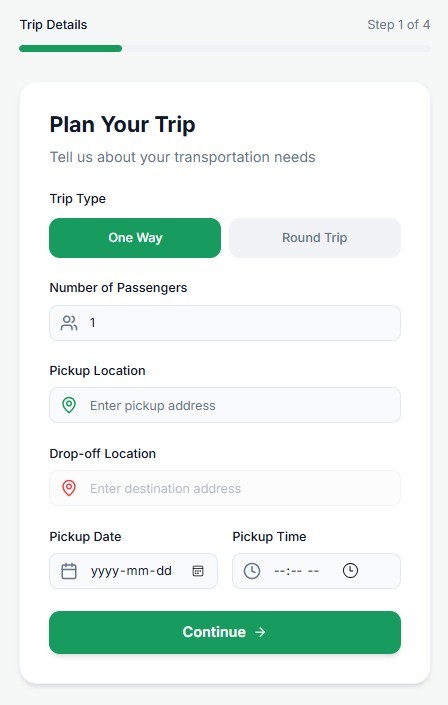
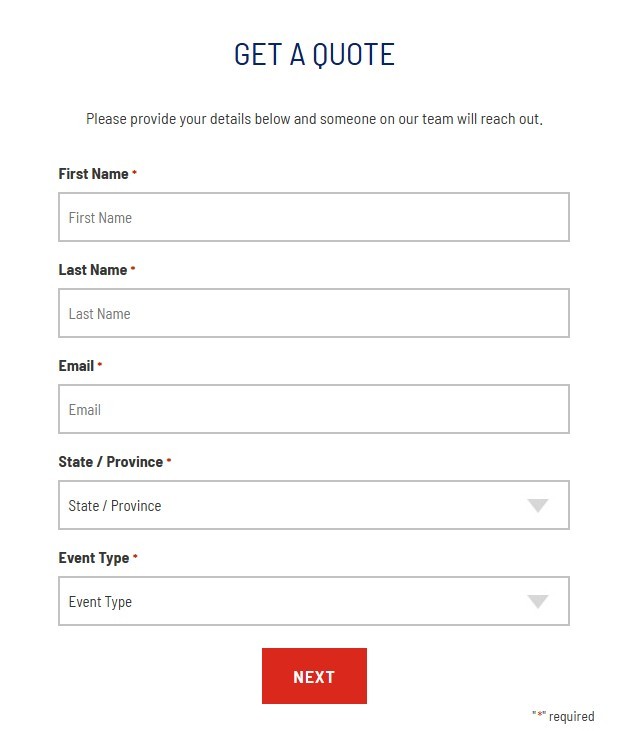
Kill the โ€œRequest a Quoteโ€ Button.

Stop forcing customers to wait 24 hours for a PDF.
Give them real-time pricing and instant booking on your website today.

gridops reservation sytem booking flow
a booking form used by charter and limo opertors

Kill the โ€œRequest a Quoteโ€ Button.

Stop forcing customers to wait 24 hours for a PDF. Give them real-time pricing and instant booking on your website today.

gridops reservation sytem booking flow
a booking form used by charter and limo opertors

Kill the โ€œRequest a Quoteโ€ Button.

Stop forcing customers to wait 24 hours for a PDF.
Give them real-time pricing and instant booking on your website today.

gridops reservation sytem booking flow
a booking form used by charter and limo opertors

Want help putting AI to work in your business?

Hands-on setup and team training for bus operators.

See AI Services