QT-1045Multi-day3
2h4Calgary → Banff → Lake Louise
In 31 days · 8:00 AM · 44 passengers
$7,650.00Estimate

The quote board for today’s charter and motorcoach operators
The quote board, booking form and quote builder in one. Every request priced from your rates, checked by you, sent in one click, and chased until it’s booked.
$40 per bus per month, with a 30-day free trial.
WHAT IT IS
GridOps is charter bus quoting software for bus, coach and motorcoach companies in Canada and the US.
It replaces quoting from a shared inbox, a spreadsheet and a calculator on your desk. Requests come in from the booking form on your website, from a customer’s email, or from the phone. GridOps prices each one from your own rates: per kilometre or mile, per hour, minimum hours, empty legs, weekends and holidays.
You check the trip and the price side by side, send it in one click, and GridOps follows up until it’s booked.
Your day, changed
The same seven steps of every charter quote. Pick a step to see what changes.
The quote board
Sales teams have run their deals on boards like this for decades: every deal in a column, every next step obvious. GridOps brings the same process to charter bus and motorcoach quoting. Designed for visibility. Designed for action. Designed to convert. Designed for simplicity.
01
See every request, and how long it has waited.
A clock on every new request: green, amber, red, then pulsing.
Your team is emailed at once, reminded at 1 hour and 6 hours, and sent a 6am summary.
See when a customer opens the email and views the quote.
Where your quotes go shows the step that loses the most jobs. Open Insights on the board above.
02
Every card tells you the one thing to do next.
New requests wait on one button: Check & send.
Customer phoned to say yes? Mark accepted, and it’s booked.
Quiet quotes show a Remind button, and follow themselves up after 48 hours.
Booked trips with no bus or driver yet land in your dispatch action queue.
03
Win the job while the customer is still deciding.
Worth a call ranks who to phone first, and tells you why.
Quiet quotes are followed up after 48 hours, in your wording.
Customers get an instant price on your website, or you review it first.
The deposit is taken the moment they accept.
04
One board, one click, no retyping.
Cards move from New to Sent to Booked by themselves.
Check & send puts the whole trip beside the price.
Paste a customer’s email and the trip fills itself in.
The same board works on your phone.
Four ways in
However a bus charter request reaches you, it lands on the same board, priced from the same rates. Customers can also book on your own website through the charter booking engine.
01
Quote while they’re still on the line.
Build and price the trip in the quote builder as they talk
Customer says yes? Accept the quote for them
Email a payment link or an invoice before you hang up
02
Quote at the counter, or at their office.
Price the trip in front of them, from your own rates
Accept it for them and email a payment link they can pay on the spot
Record cash, cheque or e-transfer if they pay another way
03
Forward it or paste it. GridOps reads it.
Forward to your private GridOps address and it becomes a request
Or paste the email and the trip fills itself in
The customer gets a “we got your request” email at once
04
An instant price, or your review first.
A booking form as a link, an embed, a Book now button or a pop-up
Simple trips can get an instant price, if you choose
Complex trips, like multi-day, come to you to price
03 · BY EMAIL
Drop in the customer’s email and GridOps reads the customer, date, pickup, stops, drop-off, return and passengers. Anything it isn’t sure about is flagged for you, and extras like luggage or wifi become notes.
04 · FROM YOUR WEBSITE
Put a booking form on your own website as a link, an embed, a “Book now” button or a pop-up. Choose Instant price, or Review before sending and check every price first.
Your own questions can change the price, and if someone leaves the form halfway, GridOps emails them a link to finish.
Ask about bags, alcohol on board or child seats, and let each answer add a charge. You choose whether it’s required and whether it’s taxed.

When a request runs over several days, the form asks whether the bus stays, which days it’s needed and about the driver’s hotel, then sends the trip to you to price.

If someone gives their email and leaves your booking form before the end, GridOps emails them a link to pick up where they left off. When they finish, the request lands on your board.
Quote builder
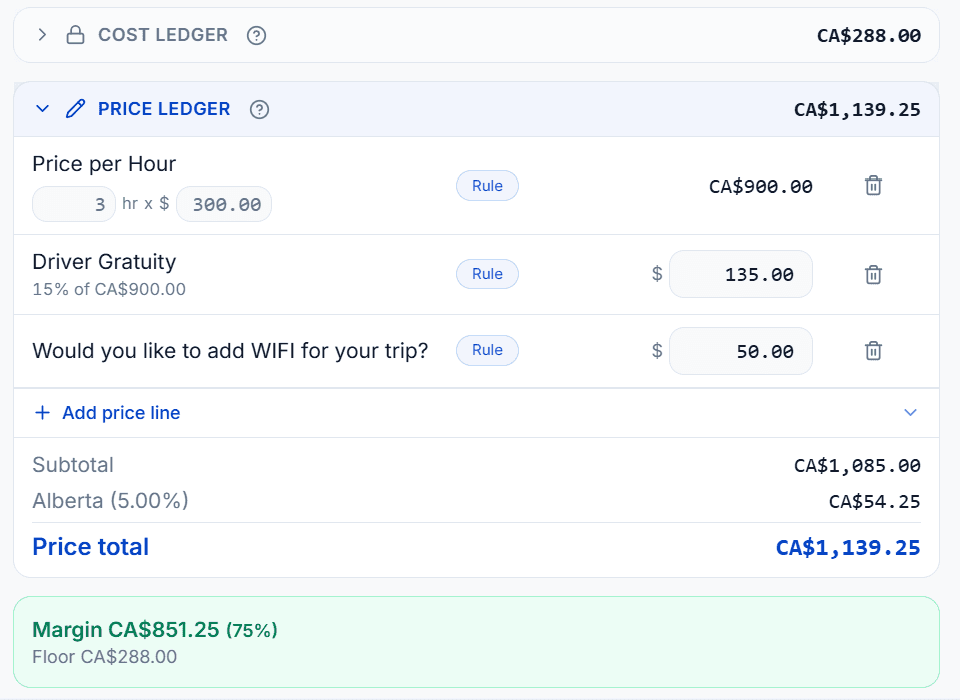
This is charter bus pricing software that works from your own rates. Set your price per kilometre or mile, per hour, your minimum hours and your minimum trip price, and GridOps measures the road distance and driving time for each route, including the drive from your yard and back.
Every line shows its maths
Switch any rule off
Cost and margin on every quote
Below cost needs a manager’s approval
What the customer pays and what the trip costs you, side by side. You always know what you’ll make before you send.
What they pay
Every rule on its own line with its maths, like 250 km × $3.10, then tax.
What it costs you
What the trip costs you: driver time, fuel and the empty legs from your yard and back.
What you make
Price before tax, minus cost, worked out on every quote. Quote below cost and it waits for approval before it goes out.
GridOps measures the whole day from your yard and back: driving with guests, parked and waiting, and the empty legs. Only the driving with guests goes on the customer’s quote. The rest is for you.

Every rule shows its maths. Switch one off to see what it’s worth, and watch the total, your cost and your margin change.
What you can price
Six round-trip models
Empty legs on their own line
Driver time and fuel from your yard
Weekends
Nights
Holidays, on your local clock
Longer-trip discounts
Multi-day trips
Multi-stop trips
Several vehicles, one quote
Fees only when the customer says yes
Taxes by province or state
Not sure you’re pricing everything? Read about the charter costs operators most often forget.
Quote emails
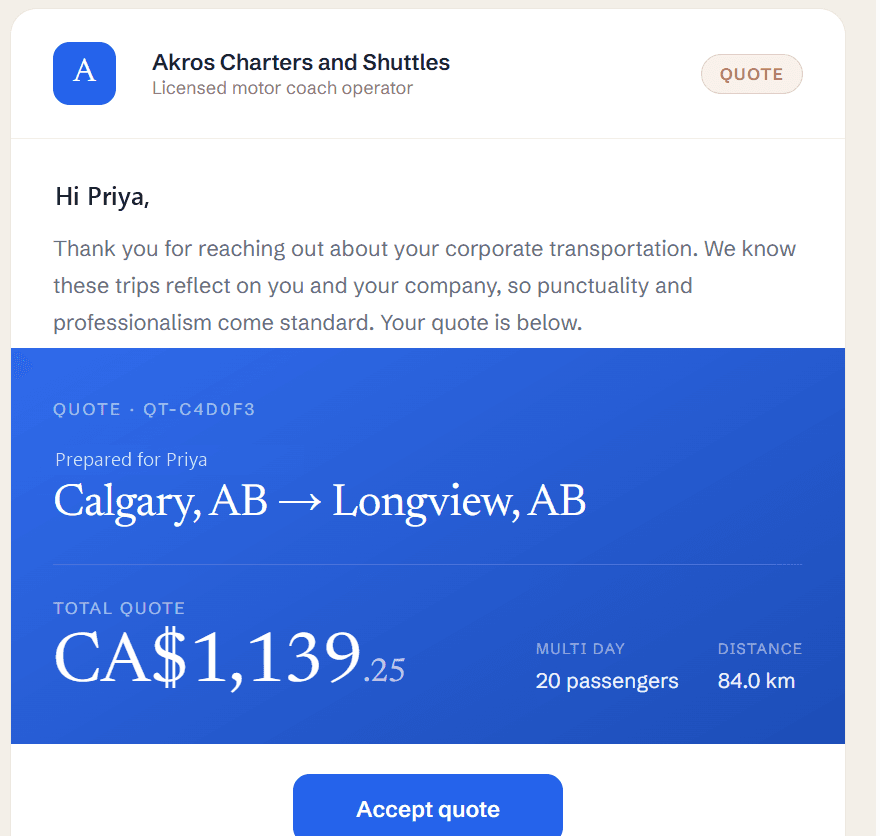
Every quote email starts from your own template, one for each kind of trip. Before you send, change the wording for this one customer and see exactly what they’ll get: your logo, the trip, the price and an Accept quote button. Your saved template stays as it was. Every other customer email is covered by the charter bus CRM.
Templates for each kind of trip
Edit the wording for one customer as you send
Copy a second person on the quote
Save your send settings as your defaults
Team notes
Sales, dispatch and your drivers talk right on the quote, not in a group chat or a sticky note. Leave a note, @mention a person or a whole team, and it follows the quote into the booking.
@mention a person, or all your Dispatchers, Drivers, Sales, Managers or Accounting
Pin the note everyone has to see
Notes follow the quote into the booking
Internal only: the customer never sees them
Deposits
The customer accepts online and pays by card: a deposit, the full amount, or nothing, as you choose. GridOps charges any balance to the saved card on its due date, and the money goes to your own Stripe account. See how deposits, balances and refunds work in bus company payments.
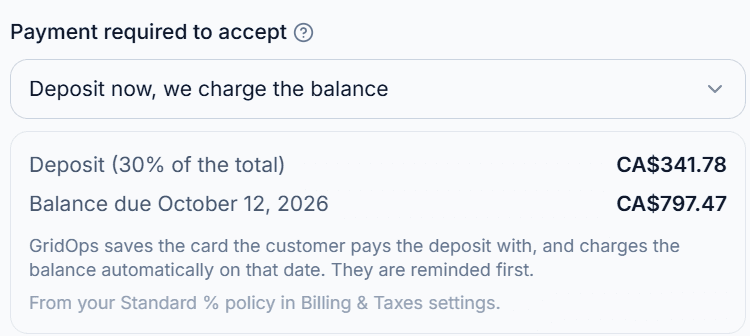
Customer phoned to say yes? Accept the quote for them, even after the link has expired, then send a payment link.
Optional: customers accept on your own website instead of a GridOps page.
Customer history, email tracking and team controls come with every quote, so nobody keeps a spreadsheet on the side.
Your quotes
Prefer rows to columns? Switch the board to a list of every quote.
Close a quote you lost and record why, so the pattern shows over time.
Customer came back? Reopen the quote instead of starting again.
Your customers
Every quote, booking, payment and email for a customer on one timeline.
GridOps asks for a Google review after the trip, with one reminder.
Anyone who asks for a price appears under Customers as a Lead, before they book.
Your emails
Reword most of the automatic emails, with your own logo and colours.
Delivered, opened, clicked or bounced, for every email you send.
Charter Analytics shows who started your booking form and didn’t finish.
Team and control
Owners, dispatchers, sales and accountants each see their own part.
Every change to quotes, bookings and payments, with who, when, and what it was before.
Ask Nash how to do something, or to draft a quote after you confirm.
Pricing
One price per bus for the whole charter quote software: every feature on this page included and no booking fee on charters. The founding operator price is open until December 31, 2026.
Yes. Set your booking form to Instant price and customers see a real price from your rates as soon as they enter the trip. Set it to Review before sending and GridOps prices it in the background for you to check first.
Yes. With Review before sending, nothing reaches the customer until someone on your team checks it and clicks send. Every quote shows how its price was built, line by line.
It can. Empty legs get their own line, and the yard round trip can be billed at cost or with a markup. On one-way trips you can also charge for the empty return.
Straight to your own Stripe account. Deposits, balances and refunds all run through it.
Yes. Price in kilometres or miles, charge in CAD or USD, and set taxes by province or state, including GST and HST.
Paste their email into a new quote and the trip fills itself in, or forward it to your private GridOps address. If they phone to say yes, accept the quote for them.
You can be set up in as little as 24 hours.
Yes. We can help bring over your information, so you don’t start from a blank page.
Any vehicle that can be booked or dispatched counts as a bus.
No. GridOps charges no fees on your card payments. Stripe charges its own card processing fees, which are paid to Stripe.
Book a demo to see the booking form, the quote board and the calculator working together. $40 per bus per month, with a 30-day free trial.
Run shuttles or bus tours too? They share the same dispatch board. See everything GridOps does for charter operators.
Last updated September 28, 2026